
You’re not shopping for an app. You’re shopping for relief from a specific kind of tired, the kind that resets every evening no matter how the day went otherwise. That’s the real thing under most searches like this one, even when the search itself is just an app name and a feature list.
Type “best meal planning app 2026” into a search bar and you’ll get a dozen roundups promising roughly the same handful of things: more recipes, a cleaner interface, one extra grocery integration the last list didn’t mention. None of them explain why the last three apps you tried didn’t make it past week two.
There’s already a solid ranked list of apps: Best Meal Planning Apps, Free & Paid Options Compared does that comparison well. This piece does something different. It’s a look at what a best meal planning app actually needs to do, not just claim to do on a feature chart, to earn the word “best.”
Why most “best meal planning app” lists compare the wrong thing
A features table is easy to build and easy to skim. Recipe count. Number of grocery integrations. Whether there’s a free tier. Star rating out of five. All of it is real information. None of it predicts the thing that actually matters, which is whether the household still has the app open in March.
Most best meal planning app comparisons treat the download as the finish line. It isn’t. The finish line is an ordinary Wednesday, three weeks in, after the week has already gone sideways twice, at the point where the plan either survives contact with a real household or it doesn’t. An app can win every column on a comparison chart and still fail that test. Feature count and follow-through are not the same measurement, and most roundups only ever check the first one.
Here’s what the roundups skip. The reason a household stops using a meal planning app almost never shows up in a features table. It’s rarely “not enough recipes.” It’s closer to “I had to rebuild the plan from scratch every week,” or “the grocery list didn’t match what we actually needed,” or “setup took long enough that we gave up halfway through.” Those are workflow failures. A checklist can count features. It can’t diagnose a workflow.
Forty saved recipes in a folder nobody’s opened since spring, and it’s still cereal for dinner on Tuesday, because there was no one left with the energy to pick anything else. That’s most people’s actual relationship with a “recipe library” feature, not a hypothetical, and no comparison chart has a column for it.
That gap is where most “best app” content in this category goes wrong, and it isn’t specific to meal planning. Any comparison built around what a product has instead of what a household actually finishes will systematically overrate the app with the longest spec sheet and underrate the one that quietly gets used every week without anyone thinking about it. Recipe count is trivia at that point. Completion is the metric that was never on the chart, mostly because it’s harder to screenshot than a star rating.
There’s a second reason the standard comparison misleads: apps rarely fail all at once. They fail by attrition. Week one, everything gets used. Week three, the grocery list gets skipped because rebuilding it feels like more effort than just remembering what’s needed. Week six, the app opens once, shows the same three saved recipes it always shows, and closes again. None of that shows up in a review written after a single afternoon of testing, which is roughly how most “best meal planning app” content gets produced.
What “best” really measures for a meal planning app
A Better Meal is built around a different frame: the plan is the product, not the recipe library sitting next to it. That frame is the reason for this whole piece, so it’s worth stating plainly before going further.
Call it workflow completion: the distance between “I want a plan” and “dinner is actually handled,” and how much of that distance the app closes without you doing it manually.
A meal plan that lives entirely in your head has zero completion. You’re doing all of it, every week, from nothing. A recipe app with a save button closes a little more of the gap. At least the ideas live somewhere besides memory, even if nothing else about the week gets easier. A plan that turns into an actual grocery list, without retyping every ingredient by hand, closes more still. A plan that survives the week getting rearranged, without collapsing back into “what do we do now,” closes the most.
That’s the real ranking criterion. Not how many recipes. How much of the deciding does this actually take off your plate, and does it keep working once the week stops going as scheduled.
Decision fatigue is the thing most best-meal-planning-app searches are chasing, even when the query itself never uses the phrase. Nobody’s actually short on recipes. Most households have more saved recipes than they’ll cook in a year, tucked into bookmark folders and screenshot albums nobody revisits. What’s short is the energy it takes to pick one, every single night, forever, on top of everything else the day already asked for. A meal planning app that adds another decision, which recipe of the forty saved ones, hasn’t solved the problem. It’s relocated it.
By 5:45, dinner doesn’t need to be ready. Somebody just needs to have already decided, and deciding is the part that never shows up on a feature chart.
A five-star rating and a thousand-recipe library don’t move that number. A plan that’s already made, already shoppable, and still standing when Thursday doesn’t go as scheduled does. Everything else is decoration on a chart.
What a meal planning app that survives a real week actually does
Judged against workflow completion instead of feature count, a handful of capabilities matter more than the rest of the comparison table combined.
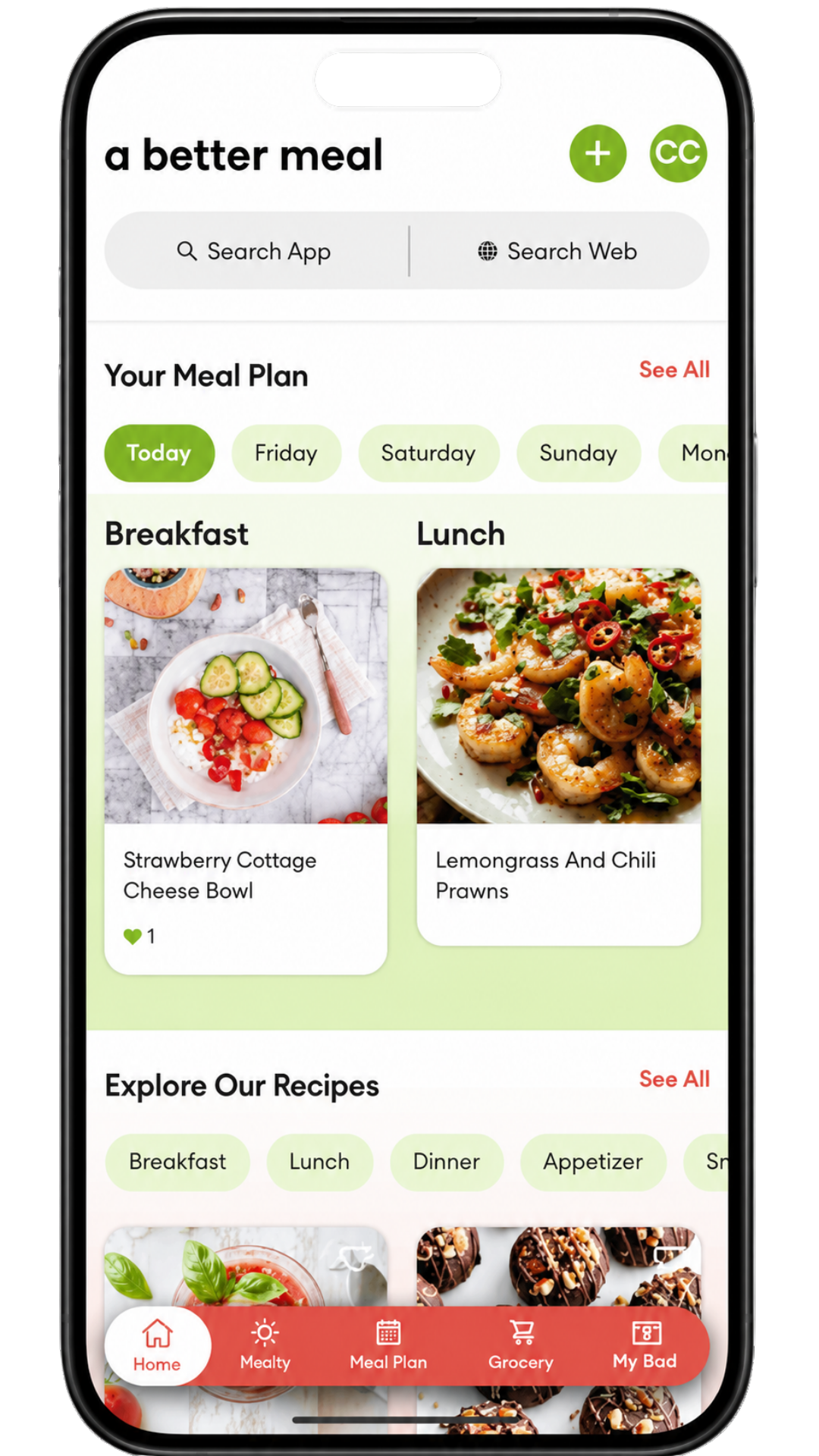
- You tell it your goals, dietary preferences, allergies, foods to avoid, and what looks good. From that, A Better Meal builds a dinner plan instead of asking you to start from a blank page.
- The grocery list gets generated from the plan in one action, sorted by aisle, and editing an item, adding one, removing one, doesn’t touch the plan underneath it.
- You can bring the recipes your household already trusts into the plan, so a family favorite doesn’t quietly get swapped out for something an algorithm picked instead.
- When the week feels too hard, you can reach for plan actions like reducing time, simplifying instructions, or choosing meals with fewer ingredients.
- A Better Meal can guide you through shopping online by opening a retailer search experience item by item. You still choose the products and check out yourself.
None of that is exotic. Most of it is also not what a comparison chart measures, because a checkbox for “has a grocery list” doesn’t distinguish between a list built by hand inside an app and one that appears the moment the plan exists. Both get the same checkmark on the same chart. Only one of them actually saves any time, and the difference only shows up once someone’s used it for a month, not once.
Take recipe import as an example of a feature that reads identically on a chart but behaves completely differently in practice. Two apps can both check the “import recipes” box. One means a household’s own trusted meals, the ones written on a card somewhere or saved from a magazine years ago, come into the plan instead of getting quietly replaced by an algorithm’s suggestions. The other means a handful of pre-loaded recipes tagged “featured,” with import buried three menus deep and rarely used. Same checkbox. Different app. The chart can’t tell the two apart, and most roundups don’t try.
Grocery integration works the same way. “Connects to your grocery store” sounds identical whether it means a genuine handoff into a cart or a search box that opens a browser tab. The best grocery list app for families covers that gap in more depth. The short version: the difference between those two experiences is exactly what a five-minute app-store screenshot review misses, and what a household discovers on the first real shopping trip.
Worth naming what doesn’t belong on this list too, because a comparison that implies a meal planning app can do everything is as misleading as one that measures the wrong things. A Better Meal isn’t a pantry tracker, a calorie counter, or a price-comparison tool. It can show what’s in the plan. It can’t see what’s in the fridge. A limit stated plainly, upfront, is worth more than a feature quietly overpromised in an app-store description and never delivered once the trial ends.
The best version of this category treats those limits as boundaries, not apologies. An app that’s honest about what it doesn’t do earns more trust than one that implies it does everything, because the second kind gets discovered eventually, usually right when a household is depending on it most.
A Better Meal isn’t a price optimizer either, and it’s worth saying that plainly instead of dressing it up. Its value on that front is indirect: a settled plan reduces the defensive shopping, the duplicate purchase, the extra trip for the one thing forgotten, that piles up around a week nobody actually planned. That’s a real payoff, just not the same one a budgeting app is built to chase. A comparison chart that scores apps on price optimization is measuring a different product category, and holding a plan-first app to that bar mostly proves the bar was wrong, not the app.
The same honesty applies to personalization. A Better Meal can draw from saved recipes, stated preferences, and past interactions, so a plan isn’t just the same hand-built rotation on repeat every week. What it doesn’t do is quietly learn a household’s habits and adapt on its own without being told. The inputs stay explicit: what you said you like, what you said to avoid. That’s a smaller promise than “the app gets to know your family,” and it’s also a promise the app can actually keep.
What “best” doesn’t require
This is the part where most best meal planning app searches are hoping for a number, and where this piece is going to disappoint slightly, on purpose. A Better Meal runs on a subscription, sold the way most app subscriptions are: through Apple’s App Store or Google Play, each with its own trial, billing, and cancellation rules. The specific tiers aren’t published here, and that’s worth naming honestly rather than papering over: price is usually the first question on a “best app” search, and the fair answer is to check the app’s own current listing rather than repeat a figure in this piece that might already be out of date by the time you read it.
What’s more useful than a price point: price is a weak predictor of whether an app earns “best.” A free tool abandoned in week two doesn’t vanish quietly. It leaves behind a half-built grocery list, a login nobody remembers, and a scramble for whatever’s fastest by dinner. That costs more, in wasted time and repeated setup, than a paid app still open in month six. A settled plan reduces the small waste that piles up around an unsettled one: the extra store trip, the duplicate purchase, the takeout order that wasn’t part of any plan at all. That’s closer to what “best” is actually buying: fewer abandoned trials, less rebuilding, more weeks that go roughly as planned instead of collapsing into whatever’s fastest by Wednesday.
A comparison built entirely around price and feature count will always favor whichever app ships the longest checkbox list, because a longer list is easier to rank and easier to screenshot. A comparison built around workflow completion favors whichever app a household is still opening on an ordinary Tuesday, three months later, without anyone remembering to be impressed by it anymore. Those are two different rankings, and a lot of best-meal-planning-app-2026 content is quietly running the first one while claiming to answer the second.


The best meal planning app for families still comes down to this
Add a household to the equation and the stakes go up. The measuring stick doesn’t change. For a family, a longer recipe catalog doesn’t move the needle much at all. What matters is whether the plan accounts for the allergy, the picky eater, the kid who decides midweek that a favorite is suddenly unacceptable, without turning every week into the same renegotiation.
Black bean tacos were the favorite in June. By August, the same eight-year-old won’t touch them. Eight-year-olds do that; a plan doesn’t need to take the blame for it, and neither does the person who made it.
You tell A Better Meal your goals, dietary preferences, allergies, foods to avoid, and recipe preferences once, and it builds a starting plan from that instead of a blank one. An app doesn’t replace a person who’s been paying attention to a household for a decade, and no meal planning app should claim to. What a good one can do is smaller and more useful: take what’s said once, the allergy, the two kids who won’t touch sauce, the vegetarian adult at the table, and start every week’s plan from that picture instead of asking for it again from scratch. Meal planning for picky eaters goes deeper on the two-dinner problem specifically, if that’s the piece of this that’s loudest for your household right now.
Families searching “best meal planning app for families” are usually asking a narrower question underneath the obvious one: will this stop being my job. It stops being the whole job, not the job entirely. Someone still cooks. Someone still gets to change Tuesday’s dinner if Tuesday doesn’t cooperate, and nothing about a good plan should take that away. But the deciding, the part that eats the most energy for the least visible return, is the part a plan-first app is built to absorb, week after week, without anyone having to ask for it again.
Common questions about choosing a meal planning app
Is a free meal planning app good enough? Depends what “good enough” is measuring. A free tier can generate a plan and a list on day one. What most free tiers don’t survive is the second and third week, once the novelty wears off and the plan needs to bend around a schedule change instead of just existing on a screen.
What’s the actual difference between a meal planning app and a recipe app? A recipe app is a library. Useful, but static. A meal planning app is supposed to be a system: a plan, a list, and a way to adjust both without starting over. Plenty of apps market themselves as the second while functioning as the first with a calendar view bolted on. Samsung Food vs A Better Meal is a closer look at exactly that split, recipe library against meal plan, if the distinction matters for what you’re comparing.
Does a “best” meal planning app actually work for big households or picky eaters? Only if the onboarding genuinely asks about them and the plan gets built around the answer, rather than a generic single-adult template. A shared plan that accounts for one allergy and one picky eater at the same table is a different problem than a plan built for one person cooking for themselves, and it’s worth checking before assuming any app scales the way its marketing implies.
Do grocery integrations actually matter, or are they a marketing checkbox? They matter when they save a real step. They mean nothing when they don’t. A Better Meal has close to 50 grocery and delivery services on the roster, and the honest version of what that gets you is a guided search into the retailer’s own site, item by item, with you still choosing what goes in the cart. The number on a comparison chart matters less than what happens after the list is built: does it still require retyping everything into a separate app by hand, or does the plan’s list actually get you most of the way into a cart with the items already searched.
How long does it actually take to get a usable plan for the first time? Longer than a five-second demo video implies, shorter than a full afternoon. The honest range depends on how much the onboarding asks upfront: goals, dietary preferences, allergies, and what actually sounds good this week. The more useful question is whether the fifth plan, three weeks later, takes less effort than the first one did, rather than the same amount all over again.
What actually earns the word “best”
None of this is a knock on comparison charts. Recipe counts and integration counts are real, and they’re not nothing. They’re just answering a smaller question than the one most people searching “best meal planning app” are actually asking. The bigger question is whether a plan holds up once a real week starts pushing back on it, and that’s a workflow question, not a features question.
A Better Meal is built around that answer specifically. The plan is the product, generated from what you tell it once and rebuilt from that picture every week, not a recipe library with a planner bolted on top. It won’t track your pantry, count your calories, or find the cheapest cart. It will take the deciding off your plate, turn it into a shoppable list, and still be standing when the week doesn’t cooperate.
Stop replanning every Monday. A Better Meal does the plan once.